Appearance
前言
最近在添加封面默认图片的时候,总觉得很繁琐,索性就想着自己写一个随机图片api
解决思路
替换图片API
修改默认封面地址为自己的随机图片API接口,但是会发现文章封面都是同一个图片 
刚好之前在浏览Issues的时候发现有人提交了个PR可惜并未通过。大佬说需求比较小众,所以就未采纳,不过既然遇到了这个问题,就刚好借鉴下这个思路
添加随机封面函数
- 打开
hexo根目录\themes\butterfly\scripts\filters新建一个myRandomCover.js文件 - 将以下代码复制进random_img.js文件并保存
javascript
/**
 * Butterfly
 * ramdom cover
 */

"use strict";

hexo.extend.filter.register(
  "before_post_render",
  function (data) {
    const { config } = this;
    if (config.post_asset_folder) {
      const cover = data.cover;
      if (cover && cover.indexOf("/") === -1) data.cover = data.path + cover;
    }

    if (data.cover === false) {
      data.randomcover = randomCover();
      return data;
    }
    data.cover = data.cover || randomCover();
    return data;
  },
  0
);

function randomCover() {
  const theme = hexo.theme.config;
  let cover;
  let num;
  if (theme.cover && theme.cover.default_cover) {
    if (!Array.isArray(theme.cover.default_cover)) {
      cover = theme.cover.default_cover;
    } else {
      num = Math.floor(Math.random() * theme.cover.default_cover.length);
      cover = theme.cover.default_cover[num];
    }
  } else {
    cover =
      theme.default_top_img ||
      "data:image/gif;base64,R0lGODlhAQABAIAAAAAAAP///yH5BAEAAAAALAAAAAABAAEAAAIBRAA7";
  }

  if (theme.cover.suffix) {
    if (theme.cover.suffix == 1)
      cover = cover + ("?" + Math.ceil(Math.random() * 10000));
    else if (theme.cover.suffix == 2)
      cover = cover + ("&" + Math.ceil(Math.random() * 10000));
  }
  return cover;
}- 打开butterfly主题配置文件:在cover:插入
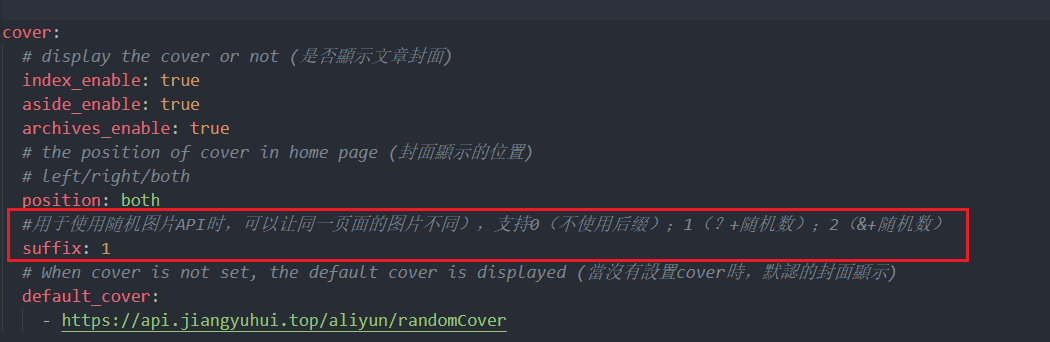
suffix: 1并保存(目的是在链接后面加入后缀?spm={随机数}0是不使用后缀、1是?加随机数;2是&加随机数)
- 最后hexo三连就生效啦~
shell
hexo clean
hexo g
hexo s